

You have opened three browser tabs and are staring at ChatGPT, Gemini, and Claude. They all say they can help you write emails, organize ideas, and answer questions. So which one do you actually use?
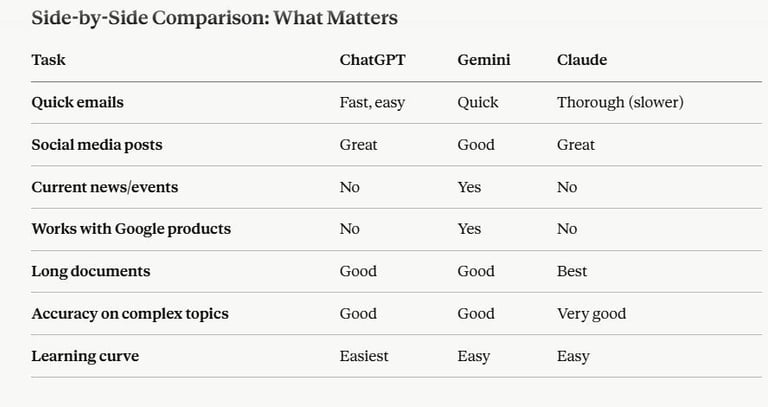
The honest answer: they are all good. They are also all different. And the right pick depends on what you are trying to do today.
This article breaks down what each tool actually does, where it shines, and where it falls short. No hype. Just a real comparison that helps you pick.
What You Will Learn
You will understand the core strengths of ChatGPT, Gemini, and Claude — and how to choose the right one for your specific task. You will also learn when it makes sense to use more than one.
The Quick Difference
ChatGPT (by OpenAI) is the most popular. It is fast, straightforward, and great for most everyday tasks.
Gemini (by Google) is built into Google products and works well with Google Docs, Gmail, and Google Search.
Claude (by Anthropic) is newer and often praised for detailed explanations and handling complex tasks carefully.
All three are free to try. All three have paid versions if you use them a lot.
ChatGPT: The Reliable Workhorse
What it does well:
ChatGPT is fast and handles most business tasks without complaint. Need to write an email? Done. Rewrite a product description? Done. Brainstorm social media post ideas? It will give you options quickly.
It is also the tool most people have heard of. If you need to explain to an employee or customer that you are using AI, ChatGPT is the easiest name to say.
The free version gets the job done for most small business tasks. You can write, edit, and research without hitting a wall often. The paid version (ChatGPT Plus) gives you faster responses and access to the latest features first.
Where it has limits:
ChatGPT can sometimes give you confident-sounding answers that are actually wrong. It does not always know when to say "I do not know." If you are writing something important, you have to fact-check.
It also has a knowledge cutoff — it does not know about very recent events or updates. For current news or brand-new product releases, it will tell you it does not have that information.
Best for: General writing, brainstorming, customer service replies, learning explanations, and anyone who wants a simple, no-fuss tool.
Gemini: The Google-Integrated Option
What it does well:
If you live in Gmail, Google Docs, and Google Calendar, Gemini feels like it was built just for you. You can open Gemini directly in Gmail and draft replies without switching tabs. In Google Docs, you can ask it to write a section or rewrite a paragraph without leaving the document.
Gemini also has real-time access to Google Search results. If you ask it a question about current events or recent product releases, it can tell you. ChatGPT and Claude cannot do this as easily.
The free version is solid. Google lets you use it without constant limits.
Where it has limits:
Gemini is still improving. Some users find it less nuanced than Claude or ChatGPT on complex writing tasks. It is good, but it is not always the deepest thinker in the room.
If you do not use Google products, there is no advantage. Gemini does not integrate as smoothly with Outlook, Slack, or other popular business tools.
Best for: Anyone already using Google Workspace (Gmail, Docs, Calendar), research that needs current information, and people who want AI built into the tools they already open every day.
Claude: The Careful Thinker
What it does well:
Claude has a reputation for being thoughtful. It explains things in detail. It is less likely to bluff and more likely to tell you when it is unsure about something.
If you are writing something that needs to be thorough and accurate — a long email, a detailed proposal, a tricky customer situation — Claude often gives you a more complete answer.
Claude also works well with long documents. If you paste in a 5-page contract or a detailed client brief, Claude reads the whole thing carefully and gives precise feedback.
The free version is available and capable. The paid version (Claude Pro) gives you more uses per day.
Where it has limits:
Claude is newer to the scene. Fewer small business owners have heard of it or tried it. If you want a tool "everyone knows," ChatGPT is still the easier sell.
Claude also does not have real-time web access like Gemini does. For current news or recent product updates, you will need to tell it what happened.
Best for: Complex writing, detailed explanations, working with long documents, careful decision-making, and anyone who values accuracy over speed.